
Safety Switch Tripping? A Guide for Tenants
Find out if it is an appliance or the wiring, before an electrician is booked.
A step by step check for tenants in Newcastle, Lake Macquarie, Maitland and Port Stephens. About 30 minutes.
5.0 from 205 Google reviews
A safety switch is one of the switches in your switchboard: the box that holds the electricity meter and the switches that control the power to your home. Its job is to protect people from electric shock. When it senses electricity leaking where it should not, it trips: it switches itself off in a split second and the power goes off. You may also see it called an RCD.
Often the cause is a faulty appliance that is plugged in, not the wiring in the home. This guide helps you find out which, so your property manager knows whether an electrician is needed.
- Anyone has had an electric shock or tingle, even a small one, including from a tap, shower or sink
- You can smell burning or see smoke, scorch marks or sparks
- The switchboard is wet, damaged, hot to touch, or buzzing loudly
- Water is leaking into the ceiling, walls, a light or a power point
- A power point, switch or light is damaged, melted or discoloured
- Lights are flickering, dimming, or unusually bright
- Anyone in the home relies on powered medical or life-support equipment
- You feel unsure or uncomfortable at any point. That is fine
Leave the power off and keep everyone away. Someone hurt or a fire: call 000. A tingle from a tap, or flickering lights: call your electricity network (below): this can be a fault in the supply to your home. Anything else: call your property manager. After-hours numbers are at the bottom of this page.
First, is it just your home?
If your neighbours are also without power, it is a power outage, not your safety switch. If your whole home is off, your neighbours have power and nothing on your switchboard is pointing down, the problem may be the supply to your home. In both cases call your electricity network, not an electrician: Ausgrid 13 13 88 (most of the Hunter) or Essential Energy 13 20 80 (some rural areas). The network’s name is on your power bill.
Before you start
- Read the guide through first, or print it. Have a torch, and keep your phone charged.
- Dry hands, shoes on. Never touch the switchboard if it, or you, are wet.
- Keep the fridge and freezer closed. Food stays cold for a few hours.
- Write down what was happening when the power went off: raining? kettle on? washing running?
How this guide works
Part AFind the tripped safety switch
- 1Find your switchboard.
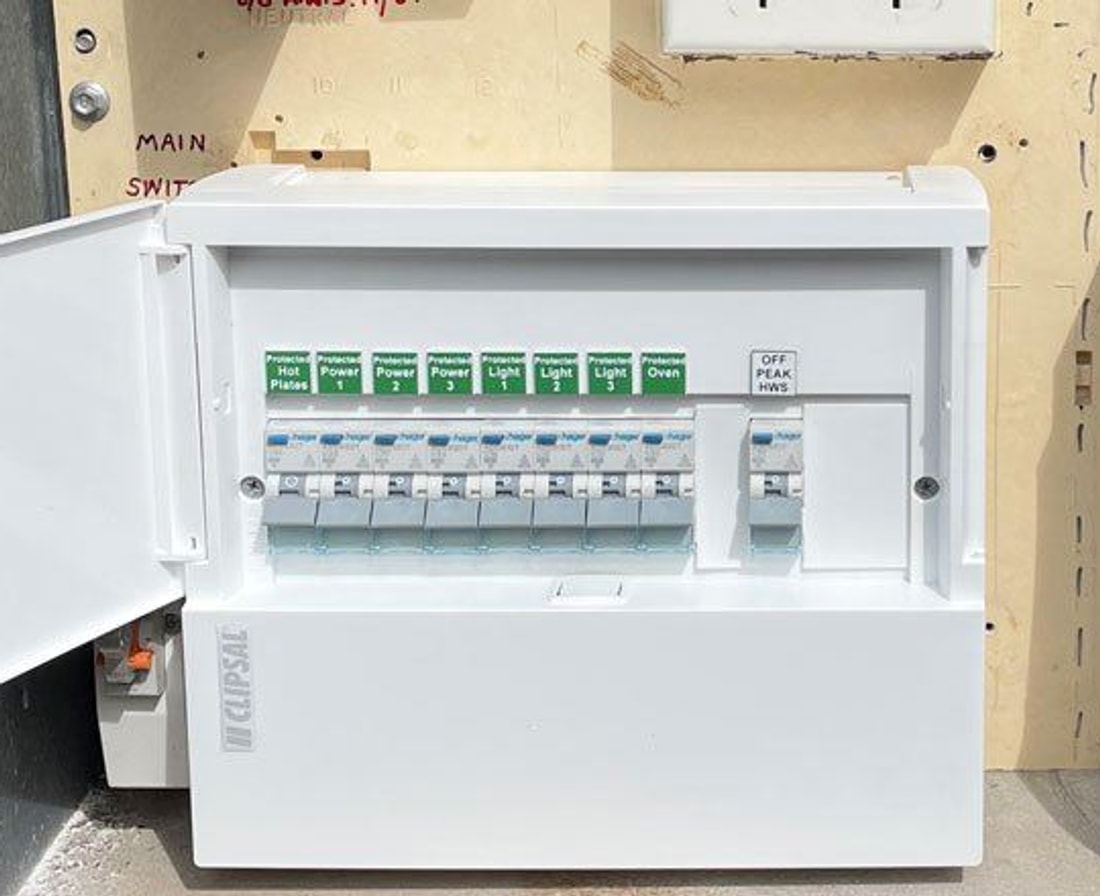
Your switchboard is the box that holds the electricity meter and the switches together. It is often called the meter box. Look for a grey, cream or white box on an outside wall, in the garage, or in a hallway cupboard. In units the meters are often in a shared meter room, with a smaller board of switches inside your unit.
Some homes also have a second, smaller board with more switches in it. If the tripped switch is not in the main box, look there too.
- 2Open the switchboard door.
Only open the hinged door or flip-up window. Never unscrew or remove any panel, and never touch anything behind one. If it is locked, contact your property manager.
Don’t touch the electricity meter, any sealed fuse, or any switch labelled Solar, PV, Inverter or Battery.
- 3Find the safety switch that is OFF.
Safety switches have a small button marked “T” or “Test”. They may be labelled “RCD”, “Safety switch” or “RCBO”. A switch is ON when its lever points up and OFF when it points down. The tripped safety switch is the one pointing down while the others point up. If your switches sit sideways, look for the one pointing the opposite way to the rest.
Your switchboard looks different?
- Every switch has its own Test button. Your home has RCBOs: a safety switch and circuit breaker in one, for each area. Follow the guide as normal, but skip Part F.
- Only a circuit breaker (no Test button) is down. Usually too many things were running in one area. Unplug things in that area, then push it firmly up once. If it goes off again, leave it OFF and report it.
- Only white ceramic fuses, and nothing with a Test button. The home may not have a safety switch, and this guide doesn’t apply. Don’t touch the fuses. Contact your property manager.
Wired-in smoke alarms may beep while the power is off. That is normal: they have a backup battery. If one keeps chirping after the power is back, tell your property manager.
Part BTry to reset it, twice at most
- 4If the lever is stuck in the middle, push it DOWN first.
Most safety switches drop all the way down when they trip. Some brands stop in the middle instead, and they won’t reset from there.
- 5Push the safety switch firmly UP to ON, in one steady push.
If it snaps straight back down as you push, it usually hasn’t broken. It is doing its job because something is still faulty.
- 6Did it stay on?Yes, it stayed onProbably a one-off: a storm or power surge can do this. Use the home as normal. If it goes off again, write down what was running and start at Part C.No, it went off againTry steps 4 and 5 once more at most. Never hold, tape or force the switch up.
Go to Part C
Part CUnplug everything
- 7Pull the plug out of every power point in the home. Every power point should end up empty.
Don’t just switch off at the wall. The wall switch usually only disconnects one of the two wires, so some faults can still trip the safety switch. Unplug power boards and extension leads from the wall too.
- 8Walk through every area and check every power point. Tick each area when it’s done.KitchenLaundryBathroomsBedroomsLiving areasGarage and shedOutside
- 9Check the sneaky ones. These are the plugs people miss most.DishwasherCupboard beside it or under the sink Gas cooktopPlug for the spark lighter, in the cupboard below RangehoodCupboard above it Built-in microwaveCupboard above or beside it Washing machine and dryerBehind the machine or high on the laundry wall FridgeBehind it, or in the cupboard beside it Second fridge or freezerGarage, shed or patio Gas or heat-pump hot waterPower point on the wall beside the unit, outside Outdoor power pointsPatio, pergola, carport, side of the house Pump power pointsPool, spa, pond and rainwater tank pumps Garage door motorPower point on the garage ceiling Wall-mounted TVBehind the TV or in the cabinet below
Don’t move heavy appliances, climb ladders, or go into the roof or under the house. If you can’t reach a plug safely, ask someone to help, or mention it when you report back.
Some things are wired in and can’t be unplugged: oven, electric cooktop, electric hot water tank, air conditioning, lights and exhaust fans. Leave them. Part F checks them if needed.
Part DReset it again with everything unplugged
- 10Push the safety switch firmly UP to ON.
If the lever is stuck in the middle, push it down first.
- 11Did it stay on?Yes, it stayed onThe fault is probably something that was plugged in.
Go to Part ENo, it went off againThe fault is probably in the home’s wiring or a wired-in appliance.
Go to Part F
Part EFind the faulty appliance
It is fine to reset the safety switch each time it goes off during this part.
- 12Plug in ONE appliance and turn it on.
Start with the fridge, so your food stays cold.
- 13Use it for about 5 minutes.
Some appliances only trip once they heat up. Boil the kettle, run the heater, or run the washing machine or dishwasher until the water warms up.
- 14If the safety switch stays on, leave that appliance plugged in and move on to the next one.
Repeat steps 12 and 13, one appliance at a time.
- 15If the safety switch goes off, unplug the last appliance you plugged in.
Put a note on it: “DO NOT USE”. Reset the safety switch. Then keep testing the rest: there can be more than one faulty appliance.
- 16Double-check it in a different room.
Plug the suspect appliance into a power point in another room: if some rooms kept their power when the safety switch tripped, use one of those. Turn it on. If the safety switch goes off again, the appliance is faulty. If it works fine there, the problem may be the first power point or its wiring: don’t use that power point, and report it.
- 17Confirm it over the next day or two.
Plug everything else back in, but not the faulty appliance, and use the home as normal. If the safety switch stays on, you have found the fault.
- 18Have the appliance repaired or replaced, then let your property manager know.
Don’t open it up or try to fix it yourself. Use an appliance repairer, the shop you bought it from, or the manufacturer’s warranty, not an electrician. If the appliance came with the property (for example a dishwasher), report it to your property manager instead.
If nothing trips
Sometimes everything goes back in and the safety switch stays on. The fault may come and go, or a few older appliances may each be leaking a little and add up to a trip together. Write down what was running each time it goes off, and include it when you report back.
Part FOnly if it goes off again with everything unplugged
Skip this part if every switch on your board has its own Test button (RCBOs). The one that tripped already tells you which area has the fault. Write down its label and report it.
- 19Turn OFF the circuit breakers beside the tripped safety switch.
These are the ones it looks after (see the diagram in Part A). If you can’t tell which ones, turn them all off. Leave the main switch ON, and any second main switch labelled “Hot water” or “Off-peak”. Don’t touch any Solar, Inverter or Battery switches.
- 20Push the safety switch firmly UP to ON.
If it goes off even with those circuit breakers off, stop here. Leave everything off and report it now. This is urgent. The fault is in the wiring, the switchboard or the safety switch itself.
- 21Turn the circuit breakers back ON, one at a time.
After each one, turn on the lights around the home and wait 30 seconds.
- 22When the safety switch goes off, write down the label of the last circuit breaker you turned on.
No label? Write where it sits instead, for example “4th from the left”.
- 23Leave that circuit breaker OFF. Reset the safety switch and turn the others back on.
You should now have power to most of the home. Report that circuit to your property manager. It needs an electrician. It is where the electrician will start looking, although the fault may turn out to be elsewhere.
Part of the home still without power?
Use a torch, take care on stairs, and keep the fridge closed until it’s back on.
What your result means
Find the row that matches what happened. You will need the row number when you report back.
| # | What happened | What it most likely means | What to do | Electrician? |
|---|---|---|---|---|
| 1 | Reset first time and stayed on (Part B) | A one-off, e.g. a storm or power surge | Use the home as normal. Note it if it happens again | No |
| 2 | Went off with one appliance, and again when it was tried in another room (Part E) | That appliance is faulty | Stop using it. Have it repaired by an appliance repairer, or replace it | No |
| 3 | Went off with one appliance in one power point, but the appliance works fine in another room (Part E) | A possible fault in that power point or its wiring | Don’t use that power point. Report it | Yes |
| 4 | The faulty appliance came with the property, e.g. a dishwasher | The property’s appliance is faulty | Stop using it. Report it to your property manager | Property manager decides |
| 5 | Stayed on with everything unplugged, but goes off once several things are in, or now and then with no pattern | Several appliances leaking a little each, or a fault that comes and goes | Report it with your notes of what was running | Possibly |
| 6 | Goes off overnight, or at the same time each day | Something on a timer, e.g. hot water, a pool pump, or a fridge defrosting | Report it with the times it happened | Possibly |
| 7 | Only goes off in or after rain | Water in an outdoor light, power point, lead or pump | Unplug all outdoor items and extension leads. Don’t touch wet power points. If it still goes off in rain, report it | Yes, if it still happens |
| 8 | A circuit breaker with no Test button keeps going off (Part A) | Too many things running in one area, or a fault in that area | Leave it off and report it | Possibly |
| 9 | Goes off when one circuit breaker is turned on, with nothing plugged in (Part F) | A wiring or wired-in appliance fault, probably on that circuit | Leave that circuit breaker off. Report it with its label | Yes |
| 10 | Goes off even with the circuit breakers off (Part F) | A fault in the wiring, switchboard or safety switch | Leave everything off. Report it now | Yes, urgent |
About call-out costs
Faults in the property’s wiring, switchboard and wired-in appliances are generally the owner’s responsibility to repair. If an electrician is sent out and the cause turns out to be an appliance you own, the owner or agent may ask you to pay for that visit. Working through this guide, and sending your results, helps make sure an electrician is only booked when one is needed.
Report back to your property manager
Send your property manager a text or an email with:
- Your name, phone number and the property address
- The date and time it went off, and the weather at the time
- What was running when it went off
- Your result: the row number from the table above
- The faulty appliance, if you found one
- The circuit breaker label or position, if you did Part F
- Any plugs you could not reach, and where you stopped if you did not finish
- A photo of your switchboard with the door open
Owner occupier?
If you own the home, use our safety switch keeps tripping guide instead. Same checks, written for owners.
Tenant questions
Why does the safety switch in my rental keep tripping?
Most often a faulty appliance that is plugged in. Water in an outdoor light or power point, and damaged wiring, are the other common causes. The steps on this page tell you which.
Who do I call when the power goes off in a rental?
Your property manager arranges repairs. If anyone is hurt or there is a fire, call 000. If the street is out or you get a tingle from a tap, call Ausgrid on 13 13 88.
Will I be charged if an electrician comes out?
Faults in the wiring, switchboard and wired-in appliances are generally the owner's responsibility. If the cause turns out to be an appliance you own, the owner or agent may ask you to pay for that visit.
Can I reset the safety switch myself?
Yes. Opening the switchboard door and pushing the switch back up is safe. Never unscrew a panel, and stop if anything is wet, damaged or burnt.